

The IGNOU Assignment Front Page is an important part of submitting your assignments at Indira Gandhi National Open University (IGNOU). In 2026, you can download the official front page format from the IGNOU website, ignou.ac.in. Filling it out correctly is simple just include details like your name, enrollment number, course code, and study center clearly.
Your IGNOU assignment is more than just answers it’s your first impression. Because assignments account for 30% of your final grade, getting the presentation right is just as important as the content you write.
The front page (or cover page) acts as the official identification for your work. If it’s missing or incorrect, evaluators may struggle to map your marks to your student record, potentially delaying your results. Here is your expert guide to nailing the IGNOU assignment front page for 2026.
IGNOU Assignment Last Date 2026
The submission deadline for IGNOU assignments depends on which Term-End Examination (TEE) session you are targeting. Since it is now July 2026, here is the status for the current academic cycle:
IGNOU Assignment Submission Status (2026)
Important Advisory: IGNOU almost always extends these deadlines. It is crucial to regularly check the main IGNOU website (ignou.ac.in) and your specific Regional Centre’s website for official notifications about extensions. Do not rely solely on the initial dates. However, try to complete and submit your assignments well before the first deadline to avoid any last-minute stress!
IGNOU Assignment Front Page Download
While submitting IGNOU Assignment, it is mandatory to attach the front page (cover page) on top of each assignment. The front page helps examiners identify your details, course, and assignment properly. Without the front page, your assignment may get rejected or delayed in evaluation. IGNOU provides a simple format for the assignment front page, which students can download and fill before submission.
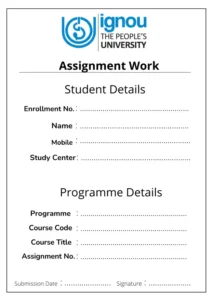
What Must Be on Your Front Page?
Precision is key. Ensure these details are clearly written on the cover sheet of every individual course assignment:
- Enrollment Number: Double-check this; it is the most critical identifier.
- Student Name: Your full name as per your IGNOU records.
- Programme Name & Code: (e.g., Bachelor of Arts, BAG).
- Course Code & Title: As specified in your assignment question paper.
- Assignment Code: Located at the top of your question paper.
- Study Centre Name & Code: The specific center where you are submitting the work.
- Mobile Number & Email ID: For quick communication.
- Date of Submission & Signature.
How to Fill IGNOU Assignment Front Page 2026
Filling out the front page is simple, but it requires accuracy. Here’s a step-by-step guide for each field:
- Enrollment Number: This is your unique 9 or 10-digit ID number provided by IGNOU. Double-check it for any errors.
- Name: Write your full name exactly as it appears on your IGNOU ID card.
- Address: Provide your current mailing address.
- Programme Title & Code: Mention the full name and the short code of your program (e.g., Programme Title: Master of Arts (History), Programme Code: MAH).
- Course Title: Write the full name of the course/subject for which you are submitting the assignment (e.g., Ancient Indian History).
- Course Code: Write the specific code for the course (e.g., MHI-04). You can find this on your assignment question paper and in your program guide.
- Assignment Code/No.: This is a unique code for the assignment itself, which is printed on your assignment question paper (e.g., MHI-04/TMA/2024-25).
- Study Centre & Code: Write the name and code of your allotted Study Centre. This information is available on your IGNOU ID card and admission confirmation details.
- Phone Number & Email ID: Provide your active contact number and email address so the university can reach you if needed.
- Date of Submission: Write the date on which you are submitting the assignment.
- Signature: Finally, sign the front page. An unsigned assignment may be rejected.
Details to be Mentioned on IGNOU Assignment Front Page
- Name of the Student
- Enrollment Number
- Program Code (BA, MA, BCA, MBA, etc.)
- Course Code & Course Title
- Assignment Number (e.g., Assignment 1, 2, or Term)
- Study Centre Code
- Regional Centre Name
- Mobile Number & Email ID
- Submission Date
- Signature of the Student
3 Essential Tips for a Professional Submission
1. The “Handwritten” Rule
While many students ask if they can print the front page, IGNOU generally prefers handwritten details to ensure authenticity. If you choose to print a template, ensure the personal fields (Name, Enrollment No, etc.) are filled out neatly by hand in blue or black ink. Never use red ink, as that is reserved for evaluators.
2. Separate Pages for Separate Subjects
Never staple multiple course assignments together under one cover page. Each course code requires its own front page. Mixing them up is the most common reason for missing grade entries.
3. Structural Best Practices
-
Paper Size: Use standard A4 white paper.
-
Include Evidence: Many study centers require you to attach a copy of your IGNOU ID card and the original assignment question paper directly behind the front page.
-
Order of Documents:
-
Front Page (Cover Page)
-
Photocopy of ID Card
-
Question Paper
-
Your Handwritten Answers
-